Track your aligners from your Apple Watch or Wear OS watch

AlignerPro puts today's Invisalign® and clear aligner wear on your wrist: a 24-hour dial, the out time you have left and your current tray. With Premium, you can take aligners out and put them in from the watch too.


Free with the iPhone and Android apps. Apple Watch needs watchOS 11 or later. How to set it up
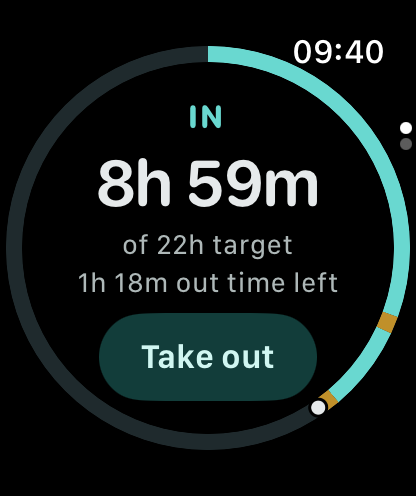
AlignerPro on Apple Watch: the 24-hour day dial with aligners in, 8h 59m of a 22 hour target
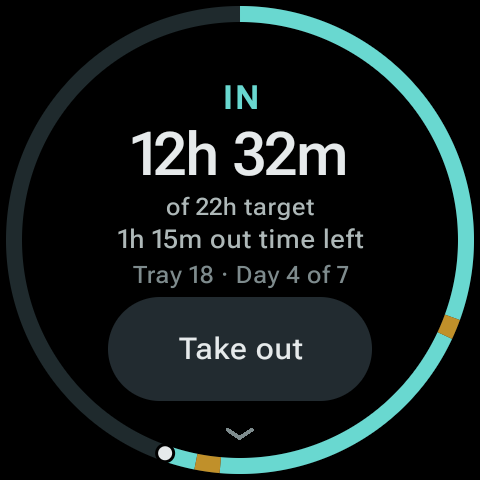
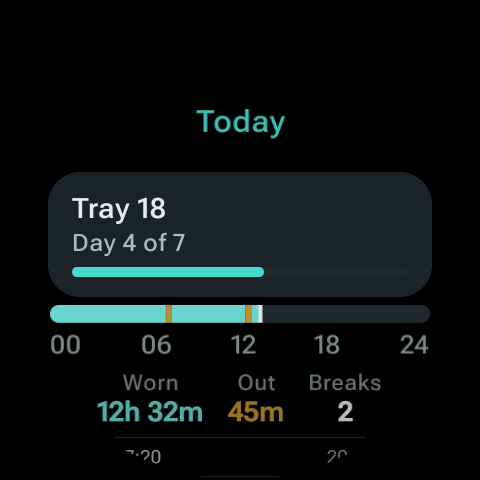
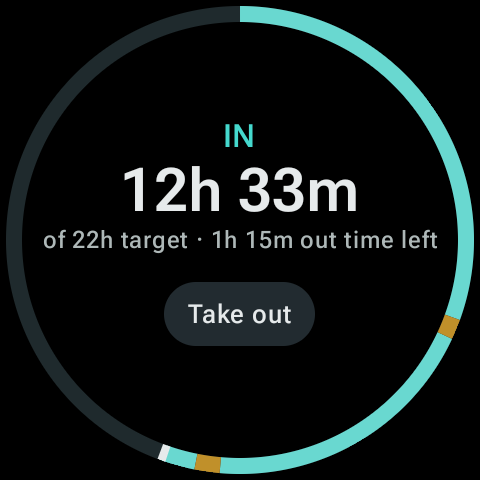
AlignerPro on Wear OS: the 24-hour day dial with aligners in, 12h 32m of a 22 hour target

Your watch is already on your wrist at the table

Most lost minutes happen around meals and coffee, when your phone is in a bag or across the room. A watch keeps the aligner timer one glance, and one tap, away.

Record breaks as they happen

With Premium, Take out and Put in are on your wrist, so a meal is recorded when it starts and ends rather than guessed at bedtime.

See your out time at a glance

The dial and complication show how much time out you have left today, against the target from your dentist or orthodontist.

Feel the reminder

Reminders from the phone app reach your watch, so a nudge to put your aligners back in doesn't sit unseen in a bag.

The same app on both watches

Apple Watch and Wear OS show the same screens, synced from the phone app. Apple Watch is on the left and Wear OS on the right in each pair.
Apple Watch timer: aligners in, 8h 59m of a 22 hour target, 1h 18m out time left, with a Take out button
Wear OS timer: aligners in, 12h 32m of a 22 hour target, 1h 15m out time left, tray 18 day 4 of 7
Aligners in The 24-hour dial with today's total against your target, the out time you have left and your current tray.
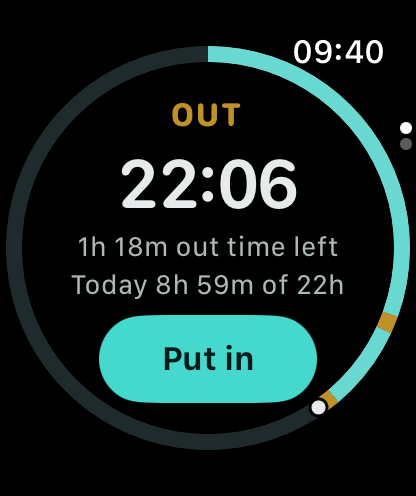
Apple Watch timer: aligners out, with 1h 18m out time left and a Put in button
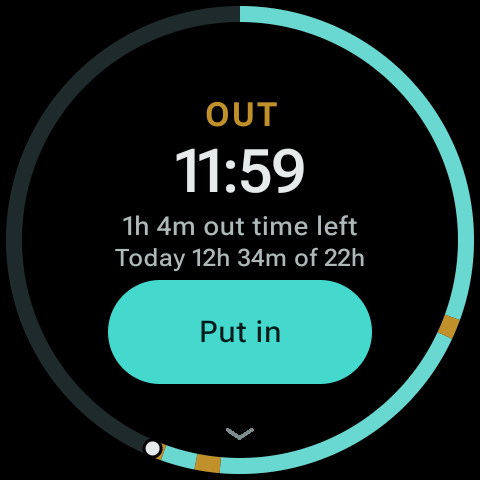
Wear OS timer: aligners out for 11 minutes 59 seconds, 1h 4m out time left, with a Put in button
Aligners out The break timer counts up, with the out time you have left today and a Put in button.
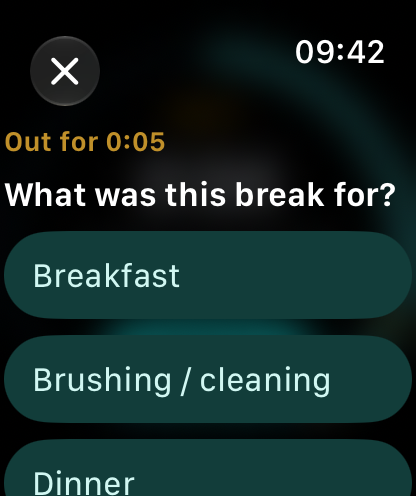
Apple Watch asking what the break was for, with Breakfast, Brushing / cleaning and Dinner
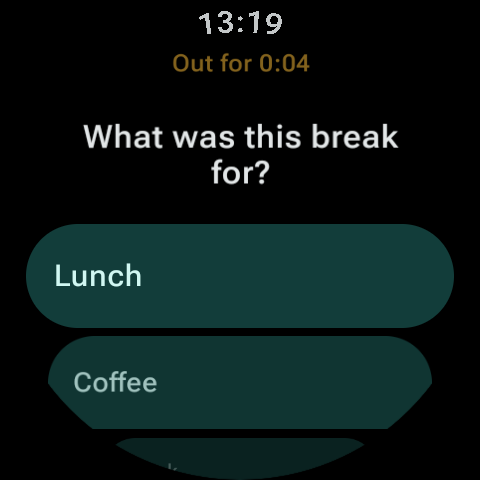
Wear OS asking what the break was for, with Lunch and Coffee
Say what the break was for Tag a break as breakfast, a coffee or brushing, so the day makes sense when you look back. Premium.
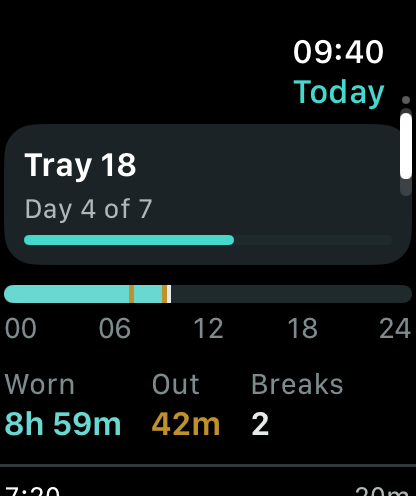
Apple Watch Today page: tray 18 day 4 of 7, a day timeline, 8h 59m worn, 42m out, 2 breaks
Wear OS Today page: tray 18 day 4 of 7, a day timeline, 12h 32m worn, 45m out, 2 breaks
Today at a glance Your tray and day, a timeline of the day so far and totals for time worn, time out and breaks.
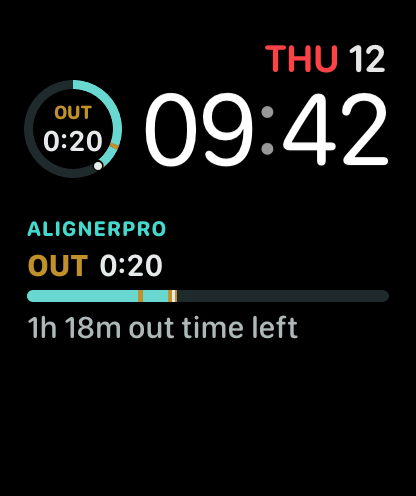
Apple Watch face with AlignerPro complications: aligners out for 20 minutes, with 1h 18m out time left
AlignerPro Tile on Wear OS: aligners in, 12h 33m of a 22 hour target, 1h 15m out time left, with a Take out button
On your watch face Complications on Apple Watch, including the Smart Stack, and a Tile on Wear OS show the timer without opening the app. They're free for everyone.

Your whole day, drawn as a circle

The ring starts at the top with the start of your day and runs clockwise for 24 hours. It's the Calendar timeline from the phone app, wrapped around the watch face. Move through this sample day to see how the watch reads at breakfast, lunch and dinner.

  • Aligners in
  • A break
  • Rest of the day
Watch day dial at 09:40: IN, 9h 15m IN 9h 15m of 22h target 1h 35m out time left Take out

How to set it up

Set up your treatment in the phone app first. The watch reads everything from there, so there's nothing to type on your wrist.

Apple Watch

Needs watchOS 11 or later, paired with your iPhone.

  1. Install AlignerPro on your iPhone and set up your treatment.
  2. The watch app installs on its own if Automatic App Install is on. If it doesn't, open the Watch app on your iPhone, find AlignerPro under Available Apps and tap Install.
  3. To add a complication, touch and hold your watch face, tap Edit, swipe to the complications and choose AlignerPro.
  4. Turn on reminders in the iPhone app. They appear on your watch with Put in and Take out buttons.

Wear OS

Needs a Wear OS watch paired with your Android phone, including Galaxy Watch models that run Wear OS.

  1. Install AlignerPro on your Android phone and set up your treatment.
  2. On your watch, open Google Play, search for AlignerPro and install it.
  3. To add the Tile, touch and hold a tile on your watch, then add the AlignerPro timer. The exact steps vary by watch.
  4. Open AlignerPro on your phone once, so the watch can sync your timer.

What's free and what's Premium

Checking your timer on the watch is free. Premium is a one-time upgrade in the phone app, and it unlocks the watch controls too. There's no separate watch purchase or subscription.

Free on your watch

  • The 24-hour day dial and today's total
  • Out time left and your current tray
  • The Today page with the day's timeline
  • Complications on Apple Watch and the Tile on Wear OS
  • Tonight's wear in Retainer mode
  • iPhone reminders on Apple Watch, with Put in and Take out buttons

With Premium

  • Take out and Put in from the watch app, and from the Tile on Wear OS
  • Double tap to switch, on Apple Watch models that support it
  • Say what each break was for
  • Reminders scheduled on the watch itself on Wear OS

Questions about the watch apps

Is there an Invisalign® app for Apple Watch?

Yes. AlignerPro has an Apple Watch app that tracks Invisalign® and other clear aligners. It comes with the free iPhone app and doesn't need an account.

Does it work on Galaxy Watch and other Wear OS watches?

Yes. AlignerPro has a Wear OS app and Tile for watches paired with an Android phone, including Samsung Galaxy Watch models that run Wear OS. Install it from Google Play on your watch.

Can I start and stop my aligner timer from my watch?

With Premium, yes. Tap Take out or Put in in the watch app, or on the Tile on Wear OS, and your phone records it. On Apple Watch models that support double tap, you can pinch twice instead. Without Premium, the watch shows your timer and you switch it on your phone.

Will my watch remind me to put my aligners back in?

Yes, if reminders are on in the phone app. On Apple Watch, iPhone reminders appear on your wrist with Put in and Take out buttons. On Wear OS, phone reminders show on the watch, and Premium adds reminders that the watch schedules itself.

Do I need my phone nearby?

The watch app works alongside AlignerPro on your phone, which keeps your treatment, history and settings. When the phone is out of reach, the watch shows your last synced timer. Taking aligners out or putting them in from the watch needs a connection to the phone.

Can I track my retainer at night on my watch?

Yes. In Retainer mode, the watch shows tonight's wear against the nightly target you set, and last night's total in the morning.

How many hours a day should I wear Invisalign®?

Follow the instructions from your dentist or orthodontist. Align Technology's general guidance for Invisalign® is 20 to 22 hours a day. AlignerPro uses the target you set, so the dial and totals match your own plan.

Source: Invisalign overview guide .

Apple Watch and Wear OS

Put your aligner timer on your wrist

Download AlignerPro for iPhone or Android. The Apple Watch and Wear OS apps come with it, free.

QR code for alignerpro.app/download

Scan to download

Opens the right store on iPhone or Android.